Getting Started
This is my personal setup documentation for the ROG Zephyrus G16 running CachyOS (Arch). I’m not a software engineer or developer, just someone who switched to Linux and ran into a lot of things that didn’t work out of the box. I figured I’d write it all down so others don’t have to go through the same trial and error.
If something here helps you, great. If you run into something I haven’t covered, feel free to reach out; I’m happy to think along.
Why CachyOS?
After testing multiple distributions, I settled on CachyOS (Arch) as my daily driver. CachyOS is an Arch-based distribution with hardware-specific optimizations that make it stand out for the Zephyrus G16:
- BORE/EEVDF scheduler: CachyOS ships with an improved CPU scheduler that provides better responsiveness and lower latency under mixed workloads
- Improved power management: better handling of suspend/resume and ACPI power states on AMD+NVIDIA hybrid setups
- Dynamic refresh rate support: out-of-the-box support for variable refresh rate on the ROG Nebula Display
- Built-in iGPU and dGPU drivers: the AMD Radeon 890M and NVIDIA RTX 4060 work correctly from a fresh install, including GPU switching via
asusctl armoury - ASUS Linux patches: part of Luke Jones’ work has been merged into the Linux kernel mainline (the
asus-armourydriver since 6.19), while additional ROG-specific patches andasusctltooling improvements are carried by CachyOS. Bothasusctlandrog-control-centerare available directly from the CachyOS repos; install two packages and you’re done, no deep system configuration required. CachyOS currently ships the most complete set of optimizations for this hardware
Fedora is a strong second, a solid option if you prefer a more stable release cycle over rolling. You’re in good shape as long as you’re on kernel 6.19 (already available on Fedora, but make sure to update). That said, CachyOS still feels more polished for this hardware: the CPU scheduler tuning (BORE/EEVDF), pre-configured NVIDIA driver support, and tighter integration with asusctl make day-to-day use more seamless out of the box.
CachyOS Kernel Manager
CachyOS ships the CachyOS Kernel Manager as a pre-installed GUI tool. It lets you manage installed kernels and configure the sched-ext scheduler, the Linux kernel’s extensible scheduler framework that allows userspace schedulers to replace the default one.
I use scx_lavd with the profile set to Auto. LAVD (Latency-criticality Aware Virtual Deadline) is a scheduler designed for mixed interactive and compute workloads, which makes it well-suited for a laptop used for both daily tasks and gaming.
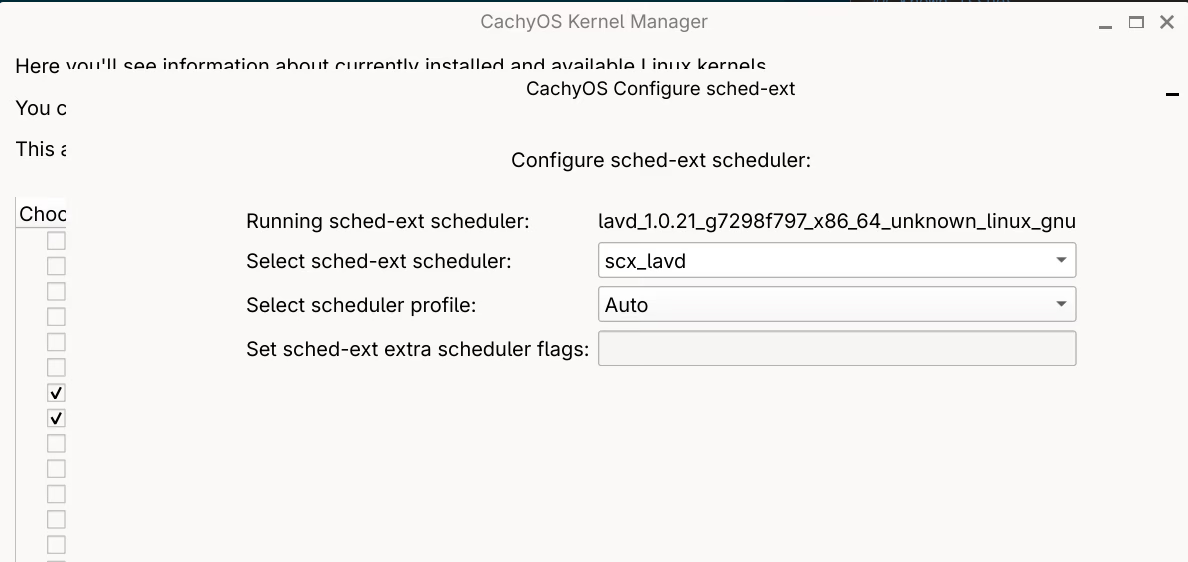
The scheduler can be changed at any time without a reboot.
Recommended setup order
After a fresh CachyOS install, this is the order that made sense for me:
Hardware & Drivers
Install NVIDIA drivers, set up Secure Boot with your own signing keys, and configure ASUS ROG hardware features (fan curves, performance profiles, GPU switching).
→ NVIDIA Driver Installation → Secure Boot → asusctl & ROG Control Center
Security & Privacy
Optionally configure GDM to skip the login screen after disk unlock. Set up the YubiKey for sudo and the GNOME lock screen via pam-u2f.
→ GDM Autologin → YubiKey
Applications
Install and configure applications: browser, communication tools, development environment, and utilities. Includes non-obvious workarounds for Brave on GNOME Wayland and touchpad scroll speed.
Networking
Get eduroam working. The official installers don’t work on Linux; a manual PEAP/MSCHAPv2 configuration via nmcli does.
→ eduroam Network Installation
Virtualization
Set up a Windows 11 VM for software that doesn’t run on Linux (Microsoft 365, etc.), or run VMware Workstation for more advanced virtualization needs.